Getting Started
Installation
pip install --upgrade findiff
For GPU / JAX support, install JAX separately (findiff detects it automatically):
pip install jax          # CPU-only
pip install jax[cuda12]  # NVIDIA GPU
For CuPy support:
pip install cupy-cuda12x
Taking Derivatives
First Derivatives
The first derivative along the 0-th axis (”\(x_0\)-axis”),
can be defined by
from findiff import Diff

d_dx = Diff(0, dx)
The first argument is the axis along which to take the partial derivative. The second argument is the spacing of the (equidistant) grid along that axis.
Accordingly, the first partial derivative with respect to the k-th axis
is
Diff(k, dx_k)
Let’s initialize a one-dimensional array f with some values, for example:
import numpy as np
x = np.linspace(-np.pi, np.pi, 100)
dx = x[1] - x[0]
f = np.sin(x)
Diff objects behave like operators — call them on a numpy ndarray
(or a JAX / CuPy array) of any shape:
d_dx = Diff(0, dx)
df_dx = d_dx(f)
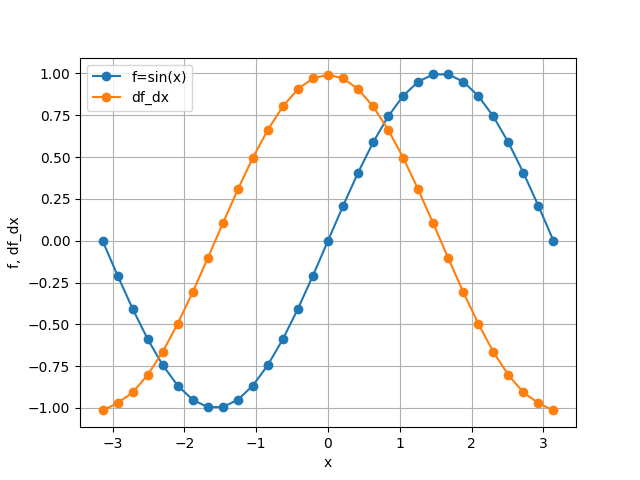
Now df_dx is a new array with the same shape as f containing the
first derivative with respect to the zeroth axis:
Higher Derivatives
The n-th partial derivative, say with respect to \(x_k\),
is written by exponentiation:
Diff(k, dx_k) ** n
A mixed partial derivative like
is written by “multiplication”:
Diff(0, dx)**2 * Diff(1, dy)
General Differential Operators
Diff objects can be combined to describe general differential
operators. For example, the wave operator
can be written as
1 / c**2 * Diff(0, dt)**2 - Diff(1, dx)**2
if the 0-axis represents the t-axis and the 1-axis the x-axis.
This works both for constant and variable coefficients.
Chaining differential operators is done by multiplication:
or in findiff:
d_dx = Diff(0, dx)
d_dy = Diff(1, dy)

(d_dx - d_dy) * (d_dx + d_dy)
Accuracy Control
By default, findiff uses finite difference schemes with
second order accuracy in the grid spacing. Higher orders can be selected
with the acc keyword:
Diff(0, dx, acc=4)
for fourth order accuracy.
Finite Difference Coefficients
findiff uses finite difference schemes to calculate numerical derivatives.
If needed, the finite difference coefficients can be obtained from the
coefficients function, e.g. for the second derivative with second order
accuracy:
from findiff import coefficients
coefficients(deriv=2, acc=2)
which yields
{'backward': {'accuracy': 2,
              'coefficients': array([-1.,  4., -5.,  2.]),
              'offsets': array([-3, -2, -1,  0])},
 'center': {'accuracy': 2,
            'coefficients': array([ 1., -2.,  1.]),
            'offsets': array([-1,  0,  1])},
 'forward': {'accuracy': 2,
             'coefficients': array([ 2., -5.,  4., -1.]),
             'offsets': array([0, 1, 2, 3])}}
Matrix Representations
For a given Diff differential operator, you can get a sparse matrix
representation using the matrix method:
x = np.linspace(0, 6, 7)
d2_dx2 = Diff(0, x[1] - x[0]) ** 2
u = x**2

mat = d2_dx2.matrix(u.shape)  # returns a scipy sparse matrix
print(mat.toarray())
yields
[[ 2. -5.  4. -1.  0.  0.  0.]
 [ 1. -2.  1.  0.  0.  0.  0.]
 [ 0.  1. -2.  1.  0.  0.  0.]
 [ 0.  0.  1. -2.  1.  0.  0.]
 [ 0.  0.  0.  1. -2.  1.  0.]
 [ 0.  0.  0.  0.  1. -2.  1.]
 [ 0.  0.  0. -1.  4. -5.  2.]]
This also works for general differential operators.
Operators also have eigs and eigsh methods for solving eigenvalue
problems directly — see the Matrix Representation guide.
Stencils
Automatic Stencils
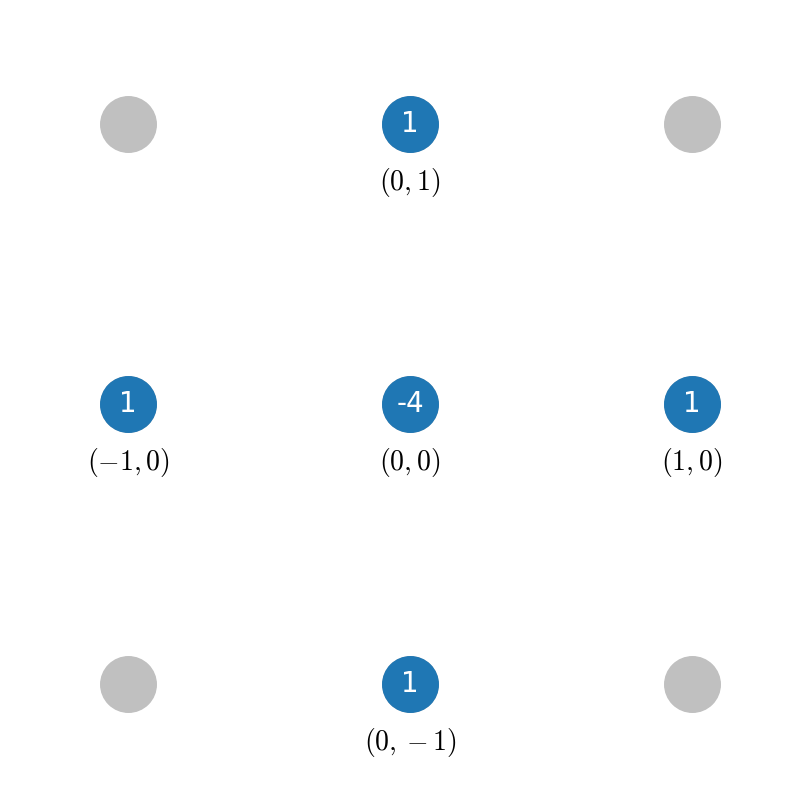
When you define a differential operator, findiff automatically chooses suitable stencils to apply on a given grid. For instance, consider the 2D Laplacian
defined (in second order accuracy) as
laplacian = Diff(0, dx) ** 2 + Diff(1, dy) ** 2
When applied, findiff selects the appropriate stencil for each grid point.
You can inspect the stencils by calling the stencil method:
laplacian.stencil(f.shape)
In the interior of the grid, the stencil looks like this:
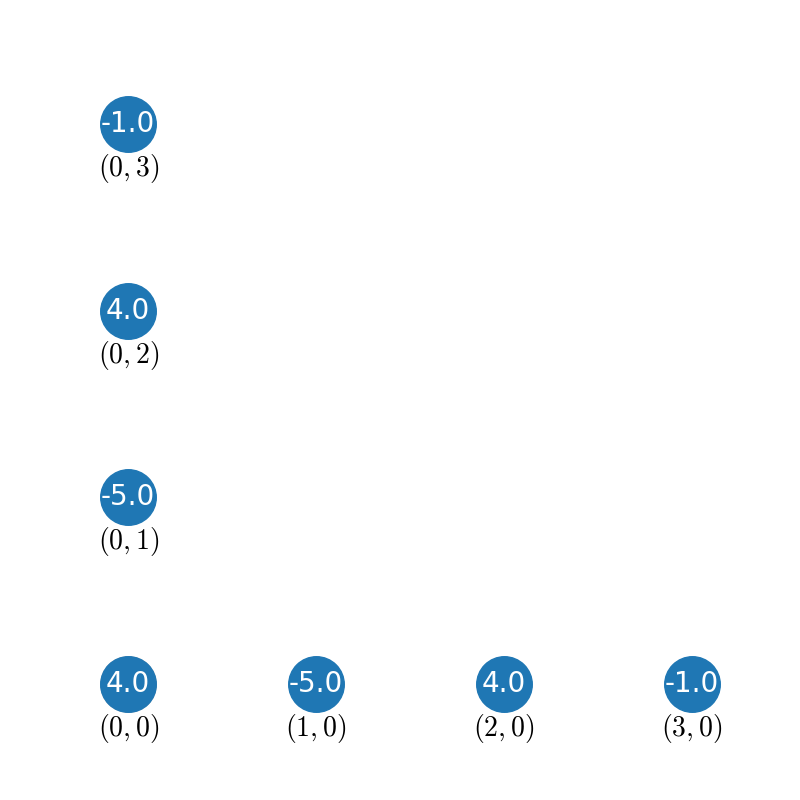
Near the boundaries, findiff automatically switches to asymmetric stencils (of the same accuracy order), for example for a corner:
Stencils can also be applied to individual grid points:
x = y = np.linspace(0, 1, 101)
X, Y = np.meshgrid(x, y, indexing='ij')
f = X**3 + Y**3

stencils = laplacian.stencil(f.shape)
stencils.apply(f, (100, 100))  # evaluate at f[100, 100] → 12
Custom Stencils
You can create custom stencils directly using the Stencil class:
from findiff import Stencil

# x-shaped offsets for 2D Laplacian
offsets = [(0, 0), (1, 1), (-1, -1), (1, -1), (-1, 1)]
stencil = Stencil(offsets, {(2, 0): 1, (0, 2): 1})
The second argument defines the derivative operator:
{(2, 0): 1, (0, 2): 1} corresponds to
\(\frac{\partial^2}{\partial x_0^2} + \frac{\partial^2}{\partial x_1^2}\).
Legacy API
Before version 0.11, the main class was called FinDiff. It is still available
for backward compatibility:
from findiff import FinDiff

# equivalent to Diff(0, dx)
d_dx = FinDiff(0, dx, 1)
New code should use Diff instead.